

What Is Paper Knife APK? A Clear Introduction to This Offline PDF Utility
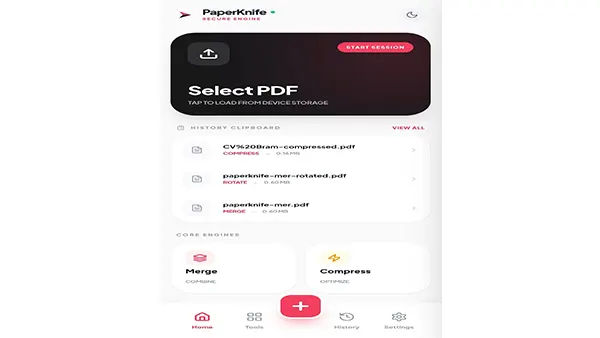
Paper Knife APK is a powerful offline PDF toolkit designed for users who want fast, secure, and private document editing on Android. Built for students, office workers, freelancers, and anyone handling sensitive files, the app merges, splits, compresses, converts, and sanitizes PDFs without ever uploading data to external servers. Its lightweight design makes tasks such as signing documents, extracting text, or preparing assignments effortless, even on older devices. With a clean interface and privacy-first architecture, Paper Knife APK offers a reliable alternative to online PDF editors, giving users complete control over their files.
Core Features of Paper Knife APK and How They Improve Everyday File Management
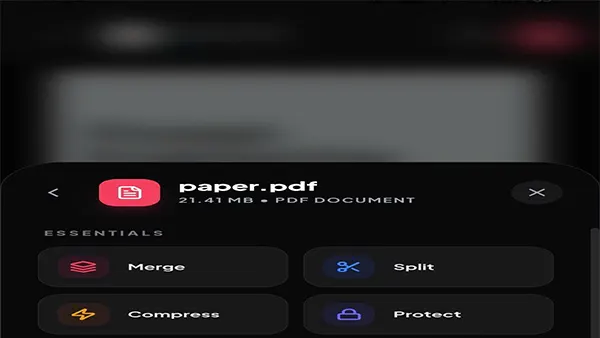
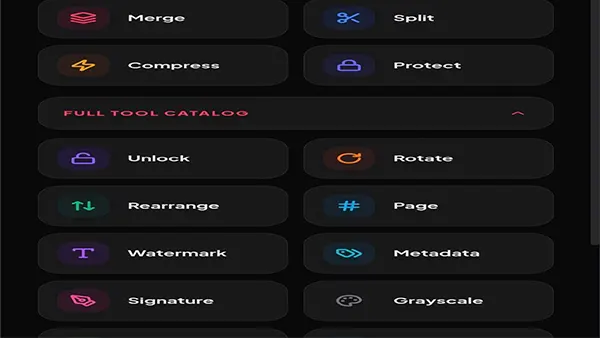
The feature set is surprisingly comprehensive for an app built around simplicity and offline design. Each tool is designed to solve common PDF frustrations.
Merge PDFs
Combine multiple documents into one seamless file—perfect for assembling reports, project files, or scanned pages.
Split PDFs
Cut large documents into individual pages or extract only the sections you need.
Compress PDFs
Reduce file size while preserving readability, ideal for email attachments or submitting assignments through online portals.
Convert PDFs to JPG/PNG
Turn pages into images for easier sharing or inclusion in presentations.
Extract Text
Pull text from PDFs to reuse in notes, documents, or study materials.
Sign PDFs
Add electronic signatures locally—useful for contracts or approval forms.
Metadata Sanitization
Remove author details, timestamps, or embedded identifiers to protect your identity.
Password Removal or Protection
Secure documents with passwords or unlock them if you have authorization.
Each feature is designed to be fast, intuitive, and practical for daily use. The design focuses on real outcomes, not complicated menus.
How to Use Paper Knife APK: Practical, Real-World Scenarios for Students and Professionals
What sets Paper Knife APK apart is how seamlessly it integrates into everyday routines. Here are the most common use cases inspired by real user behavior.
For Students
-
Compress large lecture PDFs before emailing them
-
Extract text from textbooks for summarizing chapters
-
Combine scanned homework pages into one clean file
For Office Workers
-
Sign documents without printing
-
Merge reports or invoices into project folders
-
Remove sensitive metadata before sharing documents externally
For Freelancers
-
Prepare client deliverables by splitting or reorganizing PDF pages
-
Convert pages into images for social posts or presentations
For Legal and Finance Professionals
-
Work with confidential forms offline
-
Encrypt contracts before sending
-
Sanitize metadata to protect client information
Because everything happens locally, these tasks are safe even when working with extremely sensitive documents.
Paper Knife APK vs. Online PDF Editors: A Side-by-Side Comparison for Smart Users
| Feature | Paper Knife APK | Online PDF Tools |
|---|---|---|
| File Handling | Local-only | Uploaded to servers |
| Privacy Level | Very High | Depends on provider |
| Internet Required | No | Yes |
| Speed | Instant, device-based | Depends on network |
| File Size Limits | No limits | Often restricted |
| Metadata Control | Full sanitization | Limited |
| Suitable For Sensitive Docs | Yes | Risky |
The comparison makes one truth clear: Paper Knife APK wins in privacy and convenience. Online tools may offer similar features, but they depend on a stable connection and require uploading files—which many users prefer to avoid.
Tips & Advanced Tricks to Get More Out of Paper Knife APK on Android
For users wanting to maximize efficiency, here are some expert-level recommendations:
Use Compression Presets for Email Limits
Choose low or medium compression to pass under strict file-size requirements.
Clean Metadata Before Every Share
Ideal for sensitive school projects or client work.
Extract Images for Presentations
Use the image conversion tool to integrate graphics into slides.
Organize Files Through Batch Operations
Merge multiple PDFs after scanning to avoid clutter and confusion.
Create a Signature Once and Reuse It
Save time by preparing a reusable digital signature.
These tips help users accomplish tasks faster and more securely.
Final Verdict: Who Should Download Paper Knife APK and Why It Stands Out on Android
Paper Knife APK is one of the most practical and privacy-friendly PDF utilities available for Android. Its offline design protects sensitive documents, while its robust feature set supports everything from academic tasks to professional workflows. For users tired of uploading files to unknown cloud services—or for anyone who values speed, safety, and simplicity—this app delivers a dependable experience.
If you want a powerful PDF editor that prioritizes security and convenience, Paper Knife APK is an excellent choice.
Download the latest verified version of Paper Knife APK on ModFyp to enjoy safe, fast, and offline PDF editing today.